[Swift] UINavigationControllerで戻るイベントを取得する
公開日:
:
最終更新日:2015/08/12
iPhone App 開発, Swift
Warning: Use of undefined constant user_level - assumed 'user_level' (this will throw an Error in a future version of PHP) in /home/users/1/juny/web/hidef/wp-content/plugins/ultimate-google-analytics/ultimate_ga.php on line 524
UINavigationController
UINavigationControllerを使用して画面を構成したときに、ナビゲーションバーに戻るボタンが自動的に挿入されます。
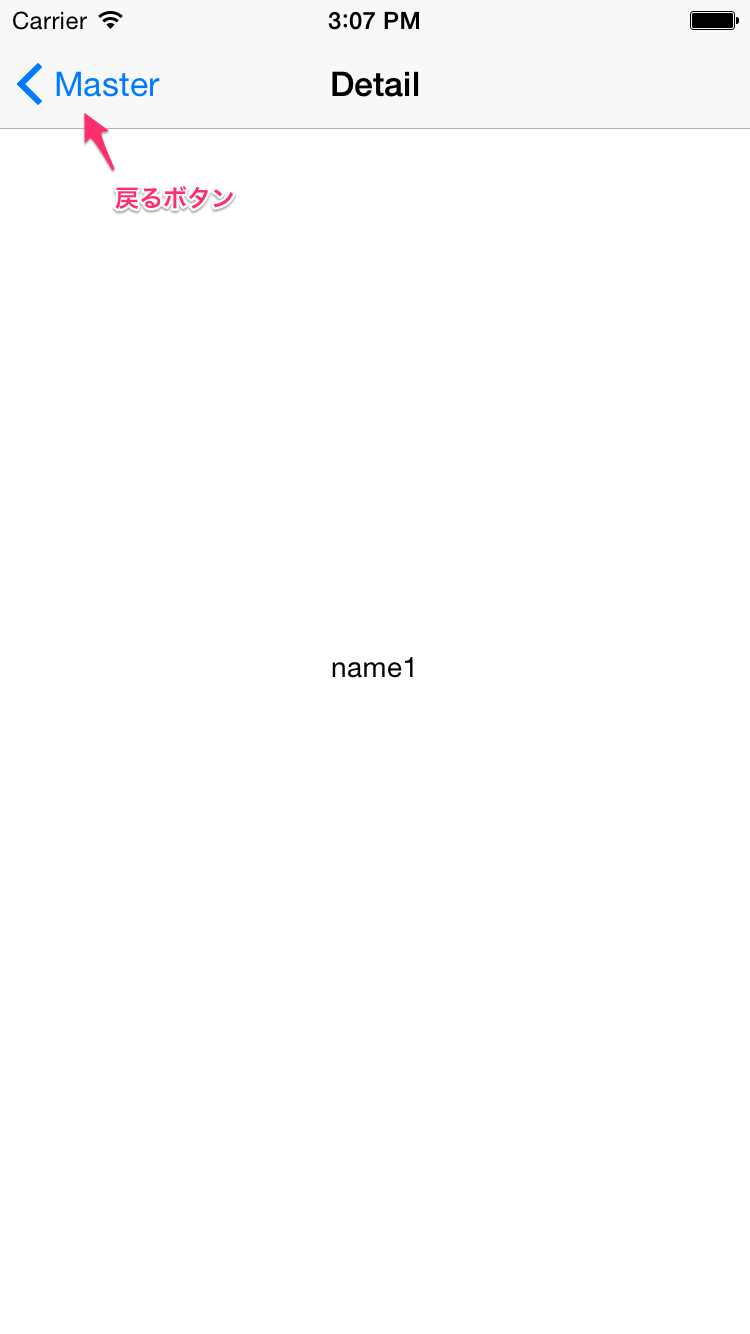
遷移後の画面から前画面に戻るときに、なんらかの処理をしたい場合は以下の方法で取得できます。
DetailViewController.swift
MasterViewController.swiftが元画面、DetailViewController.swiftが遷移後の画面だとします。
遷移後のDetailViewController.swiftに以下のコードを追加します。
override func viewWillDisappear(animated: Bool) {
    let viewControllers = self.navigationController?.viewControllers!
    if indexOfArray(viewControllers!, searchObject: self) == nil {
        // 戻るボタンが押された処理
        println("back!")
    }
    super.viewWillDisappear(animated)
}

func indexOfArray(array:[AnyObject], searchObject: AnyObject)-> Int? {
   for (index, value) in enumerate(array) {
       if value as! UIViewController == searchObject as! UIViewController {
           return index
       }
   }
   return nil
}
viewWillDisappearは表示している画面が別画面に遷移する直前に呼ばれます。
2行目でUINavigationControllerに内包されているUIViewControllerの一覧を取得。
このviewControllersには遷移する毎にUIViewControllerが追加されていきます。
viewWillDisappearが呼ばれた時点で自コントローラーは一覧からなくなっている状態なので(オブジェクトはまだ存在する)、3行目で存在チェック。
viewControllersは[AnyObject]!なのでオブジェクト同士を比較するための処理が必要です。
10行目で新規にindexOfArrayという関数を用意しました。内容は、UIViewController同士を比較して同じViewControllerであればそのIndexを返し、存在しない場合はnilが返却されます。
Objective-Cの場合
Objective-Cの場合もSwiftと同様にviewWillDisappearに記述します。
-(void)viewWillDisappear:(BOOL)animated
{
    if ([self.navigationController.viewControllers indexOfObject:self] == NSNotFound)
    {
        // 戻るボタンが押された処理
        NSLog(@"back!");
    }
    [super viewWillDisappear:animated];
}
ad

関連記事
-

-
[iPhone App] WorkManagerの不具合について
バージョン1.2.2の不具合 11/25日現在、iPhoneアプリの「WorkManger」バージ
-
-
[iPhone App] WorkManager 1.2.0版がリリースされました。
新機能 以前から要望などが多かったものを元に、機能を追加いたしました。 新バージョンで追加された
-
-
TabBarControllerとNavigationControllerのボタン追加
TabBarとNavigationを同時に使っているViewControllerの場合、naviga
-
-
Xcode5のstoryboard内でUIKeyCommandエラーの対処法
既存のプロジェクトからstoryboardにあるオブジェクトをコピペして、新規プロジェクトに貼付けた
-
-
[Swift] プロパティリスト(plist)を使ってCoreDataで一括登録する
プロパティリストを使う 初期データやあらかじめ用意したデータを一括登録したい場合、プロパティリスト
-
-
[Objective-C] no architectures to compile for … のコンパイルエラーについて
起動したプロジェクトでコンパイルエラーが出ました。 no architectures to com
-
-
[Objective-C] バージョン更新時に変更内容をアラートで出力する
アプリの更新内容を表示したい! バージョン更新時に変更内容を表示させたいのは、ユーザーがいちいちA
-

-
OSSの使い方がわからない・・・。
チュートリアル系の、storyboradでview controllerを置いて画面遷移を設定してっ
-
-
[Swift] 関数型プログラミング
関数型プログラミングについて、ストーリー仕立ての面白い記事がありましたので紹介します。 IQ1



Comment
Warning: Use of undefined constant user_level - assumed 'user_level' (this will throw an Error in a future version of PHP) in /home/users/1/juny/web/hidef/wp-content/plugins/ultimate-google-analytics/ultimate_ga.php on line 524
na より:
Warning: Use of undefined constant user_level - assumed 'user_level' (this will throw an Error in a future version of PHP) in /home/users/1/juny/web/hidef/wp-content/plugins/ultimate-google-analytics/ultimate_ga.php on line 524
はじめまして。有用な情報ありがとうございます。
こちらの件、試してみたのですが、横スワイプで戻ろうとして途中で止めた場合にも反応してしまうようです。
これを解消することは出来るものでしょうか?
Warning: Use of undefined constant user_level - assumed 'user_level' (this will throw an Error in a future version of PHP) in /home/users/1/juny/web/hidef/wp-content/plugins/ultimate-google-analytics/ultimate_ga.php on line 524
north より:
Warning: Use of undefined constant user_level - assumed 'user_level' (this will throw an Error in a future version of PHP) in /home/users/1/juny/web/hidef/wp-content/plugins/ultimate-google-analytics/ultimate_ga.php on line 524
コメントありがとうございます。お返事遅くなり申し訳ございません。
スワイプで戻る場合でのキャンセルの事象がこちらでも確認できました。
対処法ですが、viewWillDisappearでviewControllerのnil判定をしています。
ここで、フラグか何か設定しておいてviewDidDisappearで判断するのはどうでしょう。
ご確認宜しくお願い致します。